Use Teams? You May Receive an Automated Site-Review Email
Information for Employees Who Use Microsoft Teams:
Beginning Friday, Aug. 28, we are introducing a new process to help keep Microsoft Teams and SharePoint sites organized and ensure the information they contain stays current.
When a team is created in Microsoft Teams, a corresponding SharePoint site is automatically created to store the team’s shared files. As part of the new process, you may receive automated emails asking you to review or take action on the SharePoint sites you own, manage, or use.
What to Expect
The emails will come from noreply@carilionclinic.org. These are legitimate emails and should not be reported as suspicious.
The emails may be sent to the owner of a Teams/SharePoint site or to a member who has actively used the site.
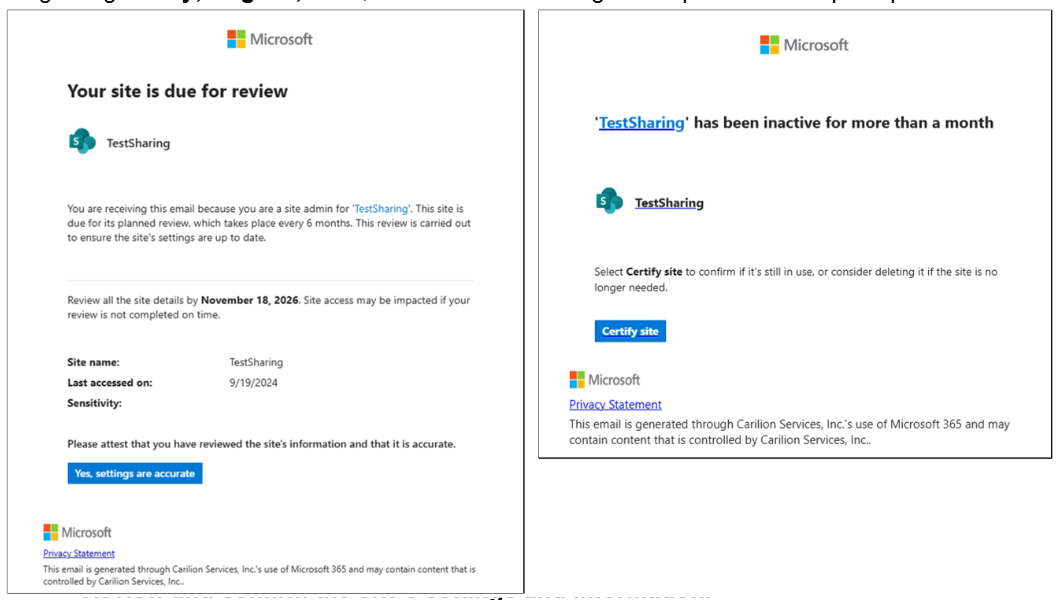
Depending on whether you’re an owner or member of the site, you may receive an email asking you to do one of the following:
- Confirm whether an inactive site is still needed
- Review and confirm the site's settings and information
- Take ownership of a site that does not currently have an assigned owner
What You Need to Do
If you receive one of these emails, follow the instructions in the message and select the appropriate action. For example, you may be asked to certify that a site is still in use, confirm that its settings are accurate, or take ownership of the site.
If you don't act right away, the site will not be automatically removed. You will still have an opportunity to take the appropriate action later.
Examples of the emails you may receive are shown below:
Questions?
For assistance, contact the Technology Service Center (TSC) through Employee Center.

If you use Microsoft Teams, you may receive an automated email asking you to review your Teams/Sharepoint site.
These emails are legitimate.
We want to ensure sites are kept up to date.
