RNs: Update Educational Info in Cornerstone by Monday, Sept. 1
We are planning to transfer RN and nursing leaders' education and certification information from Cornerstone to Workday. It's important that this information is accurately reported for Magnet. If you are an RN or nursing leader, log in to Cornerstone and verify your education and Magnet-approved certification history by Monday, Sept. 1 to ensure the correct details move to the new system.
Employees who are not RNs or nursing leaders do not need to update their information in Cornerstone.
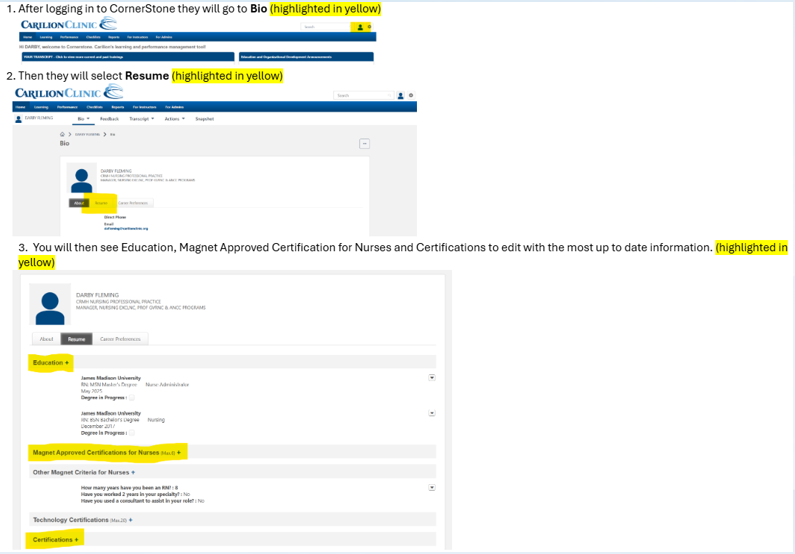
How to update your information in Cornerstone:
- Log in to Cornerstone.
- Click on Bio (outline of a person in the top right corner).
- Click on the Resume tab.
- You will then see Education, Magnet Approved Certification for Nurses and Certifications to edit with the most up-to-date information.
We are preparing to transfer data to Workday and need your help.
RNs and nursing leaders should log in to Cornerstone and update your education and certification history by Monday, Sept. 1.
Verifying this information helps ensure your information is accurate for Magnet reporting.
