Workday Refresh Arrives Sept. 18 with New Features and Easier Navigation
Several Workday enhancements will arrive Friday, Sept. 18, including a refreshed user experience, improved privacy for payment elections, smarter expense receipt scanning, and future-ready Supply Chain updates. Learn what's changing, what isn't changing, and what to expect when the enhancements go live.
✅ Quick Summary
- New Workday look and feel with improved search and navigation
- Additional privacy controls for personal bank account information
- Enhanced mobile expense reporting for hotel receipts
- New Supply Chain fields added to support future functionality
- No impact to current business processes, security access, or permissions
- No action required by employees
🎨 Updated Workday User Experience
Workday is introducing a refreshed, modern interface designed to make navigation and searching more intuitive.
What's Changing?
- A refreshed home page and cleaner overall design
- An updated search experience with a new look and feel
- Improved search capabilities that better understand natural language
- Enhanced sidebar navigation for quicker access to key pages and external links
What's Not Changing?
- Core Workday tasks such as:
- Viewing pay information
- Approving transactions
- Managing personal information
- Your security access, roles, and permissions
What Do I Need to Do?
No action is required. When the refresh goes live on Sept. 18, you'll automatically see the updated interface when you sign in to Workday.
💰 Finance: Masking Personal Bank Account Information
To enhance privacy and security, you will now have the option to mask your bank account information when adding or updating payment elections in Workday.
You can toggle the masking feature on or off and temporarily reveal your information when needed to verify accuracy.
🧾 Expenses: Expanded Hotel Receipt Information Capture
Submitting hotel expenses is becoming easier.
When you scan hotel receipts using the Workday Mobile App, Workday will now automatically capture additional information, including:
- Arrival date
- Departure date
This enhancement helps reduce manual data entry and improve expense reporting accuracy.
📦 Supply Chain: Non-Catalog Requisition Screen Update
To support future Supply Chain enhancements, two new fields will now be visible on the Non-Catalog Requisition screen:
- Order-From Connection
- Requested Delivery Date
Important: There are no changes to the current ordering process. These fields are not required at this time and should be left blank until further notice.
New Fields Preview
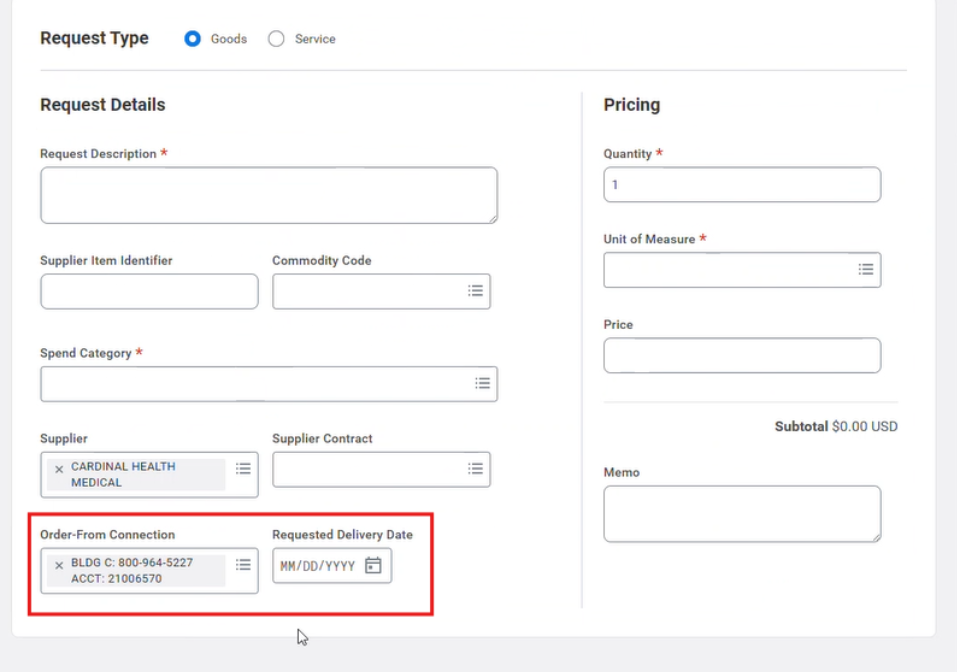
The highlighted fields are being added to support future functionality. Continue following current ordering processes and leave these fields blank until additional guidance is provided.
Questions?
Visit Employee Center for resources or to submit a ticket for help.

Be on the lookout! Workday gets a refreshed look and improved navigation on Sept. 18.
New enhancements will also improve privacy and simplify mobile expense reporting.
No action is required, and current processes and permissions will not change.
