Update on Cybersecurity Issues
Update: Friday, March 13
We are continuing our vigilance after two cybersecurity incidents at other healthcare organizations this week.
Stryker Incident: We communicated earlier this week about the cyberattack at the medical equipment company Stryker. The company reports no evidence of ransomware or malware and is actively restoring services. As a precaution, we are blocking communications to and from Stryker and have disabled related supplier accounts in Workday. There is no indication of malicious activity within our internal systems related to this incident.
Intuitive Surgical Notification: We also received notice that Intuitive Surgical (maker of the Da Vinci and Ion robotic systems) experienced a phishing-related incident that allowed an unauthorized person to access limited information within its administrative network. Intuitive has confirmed that its Da Vinci, Ion, and digital platforms were not impacted and remain safe and operational.
What You Need To Do
We continue to see an increase in repeated Imprivata Multi-Factor Authentication (MFA) prompts that users did not initiate. As a reminder:
- Do not approve any Imprivata MFA request you did not initiate.
- Deny unexpected prompts immediately.
- Report repeated or suspicious attempts to the Technology Service Center at 540-224-1599 (71599).
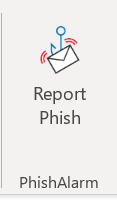
Please also remain alert for phishing emails that create urgency, request credentials, or include unexpected links or attachments. Use the Report Phishing button in Outlook so the Information Security team can review the message. Do not forward suspicious emails to other employees.
If you have questions, contact the TSC at 540-224-1599 (71599).
Original post: Wednesday, March 11
In light of this week's cyberattack on a medical technology company, we are asking everyone to remain especially vigilant about suspicious Imprivata MFA requests and phishing emails.
We are currently seeing an increase in account lockouts due to repeated Imprivata MFA requests. Hackers may attempt to log in to your account by sending many repeated Imprivata requests within a short period of time in the hopes that you will approve one to stop the repeated requests.
Please remember:
- Do not approve any Imprivata MFA request you did not personally initiate.
- If you receive unexpected Imprivata MFA prompts, deny the request immediately.
- Report repeated or suspicious Imprivata MFA attempts to the TSC right away.
Additionally, be cautious of phishing emails, including messages that:
- Create urgency or pressure you to act quickly
- Ask you to verify credentials or reset passwords
- Contain unexpected links or attachments
- Appear to come from leadership or the TSC requesting account actions
If something feels unusual, do not click and do not forward it to other colleagues to ask if they think it is a phishing attempt. Report suspicious emails using the Report Phishing button within Outlook.
Cyber incidents often spark other cybercriminals to create follow-up phishing and credential-harvesting campaigns. Your vigilance is one of our strongest defenses.
Thank you for helping protect our organization. If you have questions, contact the TSC via Employee Center, the Now mobile app, or by phone at 540-224-1599 (71599).