Stay Alert. Report Phishing. Stop Threats Early.
Have you ever clicked on a link in an email, only to realize too late that it was a phishing attempt? Or paused and wondered if an email was a scam? Phishing emails are on the rise, and they’re not always easy to spot.
Living out our value of Courage means taking action to keep our organization, our employees, and our patients safe from cyber-attacks.
What You Need to Know About Phishing
Cybercriminals use email messages that are designed to look like they are coming from a person or business you are familiar with. The messages are designed to trick you into doing things such as:
- Sharing your username and password
- Clicking on a link that infects your computer with a virus
- Downloading an attachment that infects your computer with harmful software
What to Look For
- Impersonation: Be wary of emails or messages that appear to come from Carilion executives requesting urgent actions such as purchasing gift cards or providing confidential information. Scammers have also tried to impersonate our Technology Service Center (TSC).
- Manipulation: Scammers may use publicly available information about our executives and physicians to create convincing messages.
- Urgency and pressure: Scammers often create a sense of urgency, pressuring you to act quickly without verification.
How to Report a Phish
If you suspect an email contains malicious content or spam, it's easy to report it to our Information Security team. Just click the Report Phish button in Outlook:
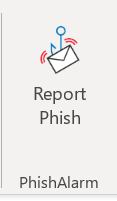
Within the email, you can also click the Report Suspicious button in the yellow or red bar at the top of the email. Here's an example:

Occasionally we send phishing simulations that are used to evaluate the potential impact of a real phishing attack. Report any emails that match the tactics described above.
If you accidentally clicked on a link within a suspected phish, call the Technology Service Center at 540-224-1599 (71599) right away to report it.
Questions?
If you have questions, email our Information Security team at Office_of_Information_Security@carilionclinic.org.
Scammers often target healthcare organizations, so be aware of common phishing tactics.
Report phishing emails using the Report Phish button in Outlook.
