Phishing: Beware of Malicious Email Links
Cybercriminals sometimes launch phishing attacks by hijacking legitimate email threads to deliver malicious links. Here are some tips from our Information Risk Management team:
What To Watch For
- Phishing links may appear as responses to previous, legitimate email conversations.
- The phishing links use spoofed URLs that are made to look like legitimate URLs.
- The URLs redirect the recipient to download an executable (.exe) file. Running the file installs malicious software (malware).
What To Do If You Receive a Suspicious Email
- Report any suspicious emails you receive at your Carilion email address using the Report Phish button in your email menu bar.
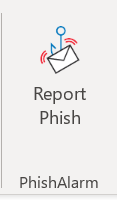
- Occasionally we send phishing simulations that are used to evaluate the potential impact of a real phishing attack. Report any emails that match the tactics described above.
- If you accidentally clicked on a link within a suspected phish, call the Technology Service Center at 540-224-1599 (71599) right away to report it.
Tips to Remember (at Work and at Home)
- Go beyond surface clues when evaluating an email. Familiar logos, branding and names don't automatically mean that an email or website is safe. Cybercriminals often spoof well-known organizations.
- Verify URLs, even if they’re sent through or posted to an internal cloud system or email platform. If a colleague's email account was compromised, the cybercriminal could be using a legitimate email address to send a phishing attack. These are very hard to spot, but your attention to detail can help.
- Some phishing attacks use compromised email accounts to respond to email threads to appear more believable. Always be sure to verify unexpected URLs from people or businesses you know through a different means of communication, like a phone call or in-person conversation.
Questions?
Contact our Information Security team at Office_of_Information_Security@carilionclinic.org.
Publish date / time
News Type
Users that Liked
1738
32311
31716
Views
0
Thumbnail Image

Unlisted
Off
Sidebar
Designated Comment Contact
emjefferson
Key Points HTML
Cybercriminals can hack legitimate email threads to send phishing attempts to people on the email chain.
Always remain vigilant when clicking on links. If a link seems suspicious, report it.
October is Cybersecurity Awareness Month. We will have information and activities available on the Information Security hub throughout the month.
