Introducing Multi-Factor Authentication: A New Security Step to Protect Our Information
MFA for remote access is now live!
About Multi-Factor Authentication
Health care systems are a top target of cybercriminals, and we’re constantly working to stay ahead of threats and keep our information secure. As part of these ongoing efforts, we’re introducing some new security measures.
Beginning Oct. 1, we will use Multi-Factor Authentication (MFA) when anyone logs in to Carilion applications outside of work. MFA is a security measure to verify your identity. It helps ensure that no one else can use your credentials to access your Carilion AD account.
If you have your Carilion email account connected to your phone, you will need to use the Outlook app to access it beginning Oct. 1. The native email apps on mobile devices fail to provide the level of security and encryption we need and present a risk to our organization. The Outlook app provides increased security and is also designed to integrate seamlessly with Office 365 and Imprivata MFA.
How It Will Work
We’ll use a tool called Imprivata ID. Everyone with a smartphone and a Carilion network log-in account (AD account) will need to register their smartphone with the Imprivata ID app. When you log in to Carilion applications outside of work, the Imprivata ID app will pop-up a notification on the smartphone screen asking you to confirm or deny the login request. This quick validation ensures that it really is you logging into your account.
For those who don’t have an Apple or Android smartphone but wish to access Carilion systems remotely, a hardware security token is available that requires you to enter a six-digit code within 30 seconds to authenticate you through the Imprivata ID system.
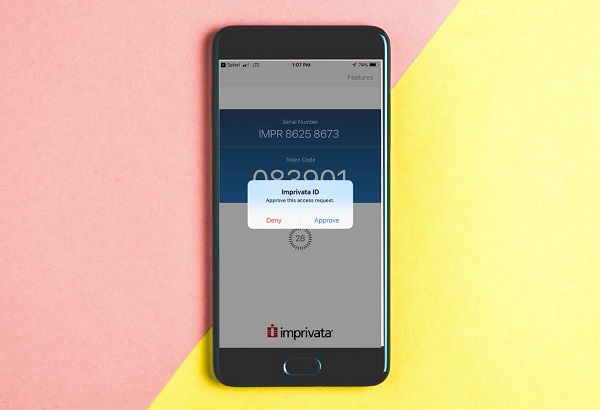
MFA will be required to access any of the following applications when you are outside the Carilion network:
- Office 365 (email, web versions of Office, Teams and OneDrive)
- The apps.CarilionClinic.org portal, which is used to access Epic Hyperspace, My Total Access, Edison and Kronos
- Other Carilion Citrix portals, including the Community Connect portal, JCHS Apps portal, Solstas Apps portal and VTC Apps portal
Who Needs To Register?
Everyone with a Carilion AD account should register, even if you do not log in remotely. This is because our AD accounts are vulnerable to phishing, and a hacker could use any employee’s AD credentials to access our network or your personal work information.
Timeline/What You Need To Do
- Before Tuesday, Oct. 1:
- If you’re not already using Outlook on your mobile phone, upgrade to Outlook Mobile. After Oct. 1, Carilion email on a mobile phone received outside the Outlook app may not work properly. Outlook mobile becomes your single app for email, calendar and contacts. Outlook mobile is designed to work securely with other Office365 mobile apps like Teams, Word, Excel and OneDrive. Upgrading to Outlook is simple:
- iPhone users upgrading to Outlook mobile can follow this step-by-step tutorial (PDF).
- Android users upgrading to Outlook mobile can follow this step-by-step tutorial (PDF).
- Prepare for MFA by downloading the Imprivata ID app on your mobile phone. Visit the Apple App Store or Google Play Store and download the Imprivata ID app.
- If you DO NOT have a smartphone, you may call the Technology Service Center to request a hardware token that can be attached to a key ring. Enrollment instructions will be provided at the time the hardware token is picked up.
- If you’re not already using Outlook on your mobile phone, upgrade to Outlook Mobile. After Oct. 1, Carilion email on a mobile phone received outside the Outlook app may not work properly. Outlook mobile becomes your single app for email, calendar and contacts. Outlook mobile is designed to work securely with other Office365 mobile apps like Teams, Word, Excel and OneDrive. Upgrading to Outlook is simple:
- Beginning Tuesday, Oct. 1, enroll with Imprivata ID. Follow this tutorial (PDF) to set up and enroll on your smartphone.
- You’ll have until Tuesday, Oct. 15 to enroll. We recommend that you register early to help keep your information as secure as possible.
- After Tuesday, Oct. 15, you will not be able to log in outside of work until you enroll the Imprivata ID app on your smartphone.
Everyone with an AD account will be assigned a short education curriculum in Cornerstone prior to the Oct. 1 go live.
Questions?
Visit the Multi-Factor Authentication page on the TSG hub for job aids and answers to frequently asked questions.
If you have additional questions or need help registering your phone, contact the Technology Service Center through Edison or at 540-224-1599 (71599).